I was working on a four-node Availability Group migration and learned something new.
Thanks to Brian Tanquary for showing me this trick.
Without round-robin routing, one read-only replica can end up doing all the work while another sits idle. If you’re already paying for multiple servers, you might as well use them.
How Round-Robin Routing Works
By default, read-only connections follow the order in your routing list. That can leave one read-only replica doing all the work while another sits idle.
With round-robin routing, SQL Server alternates new read-only connections between secondary replicas.
For example:
- Connection 1 → Secondary1
- Connection 2 → Secondary2
- Connection 3 → Secondary1
- Connection 4 → Secondary2
This isn’t enabled by default. You have to configure it with T-SQL (or PowerShell).
One thing to remember: SQL Server balances connections, not workload. It doesn’t look at CPU, memory, or how expensive a query is. It sends the next read-only connection to the next replica in the list.
Prerequisites
Before this will work:
- You need at least two readable secondary replicas
- Both secondary replicas must allow read-only connections (ALL or READ_ONLY)
- Each replica must have a READ_ONLY_ROUTING_URL
- Applications must connect through the AG listener using ApplicationIntent=ReadOnly
Configure Round-Robin Routing
Here is an example on my Azure test environment on a 3-node AG:
-- When NODE1 is primary: balance across NODE2 + NODE3

ALTER AVAILABILITY GROUP [sql-ag-01] MODIFY REPLICA ON N'SQL-AG-NODE1'

WITH (PRIMARY_ROLE (READ_ONLY_ROUTING_LIST =

  (('SQL-AG-NODE2','SQL-AG-NODE3'), 'SQL-AG-NODE1')));

-- When NODE2 is primary: balance across NODE1 + NODE3

ALTER AVAILABILITY GROUP [sql-ag-01] MODIFY REPLICA ON N'SQL-AG-NODE2'

WITH (PRIMARY_ROLE (READ_ONLY_ROUTING_LIST =

  (('SQL-AG-NODE1','SQL-AG-NODE3'), 'SQL-AG-NODE2')));

-- When NODE3 is primary: balance across NODE1 + NODE2

ALTER AVAILABILITY GROUP [sql-ag-01] MODIFY REPLICA ON N'SQL-AG-NODE3'

WITH (PRIMARY_ROLE (READ_ONLY_ROUTING_LIST =

  (('SQL-AG-NODE1','SQL-AG-NODE2'), 'SQL-AG-NODE3')));
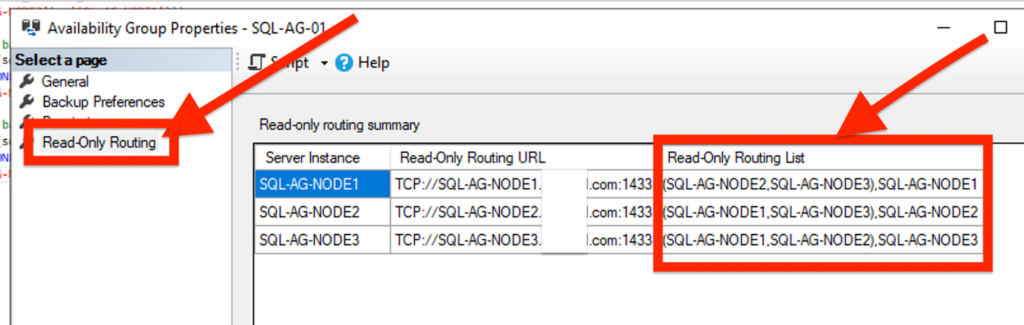
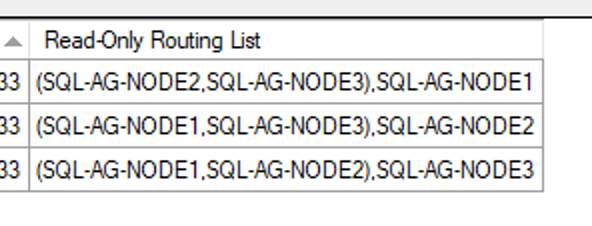
The inner set of parentheses tells SQL Server to load balance connections across those replicas using round-robin routing.
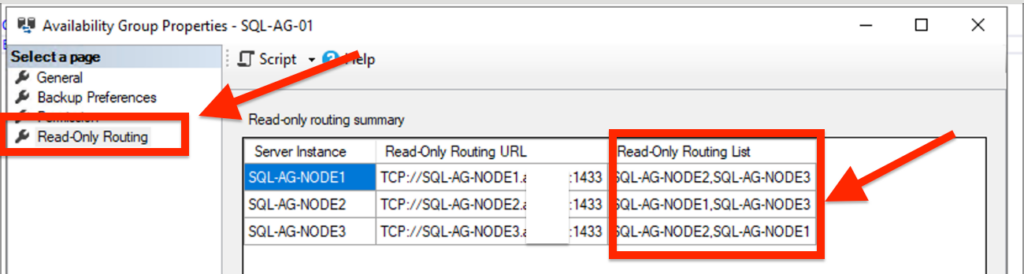
If you expand Always On High Availability → right-click your Availability Group → Properties → Read-Only Routing, you’ll see the parentheses there.
This isn’t something you configure in the GUI. You configure it with T-SQL and can verify it in the GUI.
Before
After
You can see parentheses here:
What Happens During a Failure?
If one secondary goes offline, read-only connections go to the remaining secondary.
If both secondaries are unavailable, the primary becomes the fallback.
Verify the Configuration
You can check the routing URLs and replica roles with:
Check the routing URLs:
SELECT

ar.replica_server_name,

ars.role_desc,

ar.read_only_routing_url

FROM sys.availability_replicas ar

JOIN sys.dm_hadr_availability_replica_states ars

ON ar.replica_id = ars.replica_id;
Check the routing list:
SELECT

ar.replica_server_name AS when_primary,

rl.routing_priority,

tr.replica_server_name AS routes_to

FROM sys.availability_read_only_routing_lists rl

JOIN sys.availability_replicas ar ON rl.replica_id = ar.replica_id

JOIN sys.availability_replicas tr ON rl.read_only_replica_id = tr.replica_id

ORDER BY ar.replica_server_name, rl.routing_priority;
Test it with sqlcmd:
for /L %i in (1,1,6) do @sqlcmd -S , -d -K ReadOnly -Q "SET NOCOUNT ON; SELECT @@SERVERNAME" -h -1 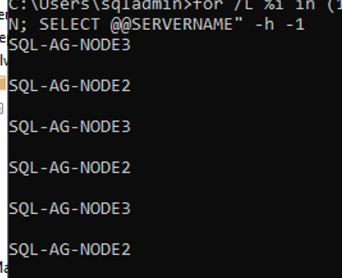
You should see the connections alternate between the secondary replicas.
Final Thoughts
The configuration is simple, requires no downtime, and you get more value from infrastructure you already own. If you’ve got multiple read-only nodes and only one is doing the work, take a look at your routing configuration. You might discover you’re only using half of what you’re paying for.


Leave a Reply